
Unlock Your Future Microsoft Dynamics 365 ERP Course at Digital Gurus Academy
Unlock Your Future with Our Microsoft Dynamics 365 course online is designed to give you comprehensive, hands-on training in all the essential modules of Dynamics 365. With expert instructors and flexible learning options, Digital Gurus Academy is the perfect place to launch or advance your career in enterprise resource planning.h Microsoft Dynamics 365 ERP Course at Digital Gurus Academy
Are you ready to elevate your career with Microsoft Dynamics 365 ERP? Whether you’re a beginner looking to start your journey or a professional seeking to enhance your skill set, the MS Dynamics 365 ERP course offered by Digital Gurus Academy is your gateway to mastering one of the most powerful and widely used enterprise resource planning (ERP) platforms in the world.

Empowering Growth Through Microsoft Dynamics365 ERP
“Empowering growth through Microsoft Dynamics 365 ERP by streamlining operations, enhancing decision-making, and driving business transformation.”
8 year
Experience
Why Choose Microsoft Dynamics 365?
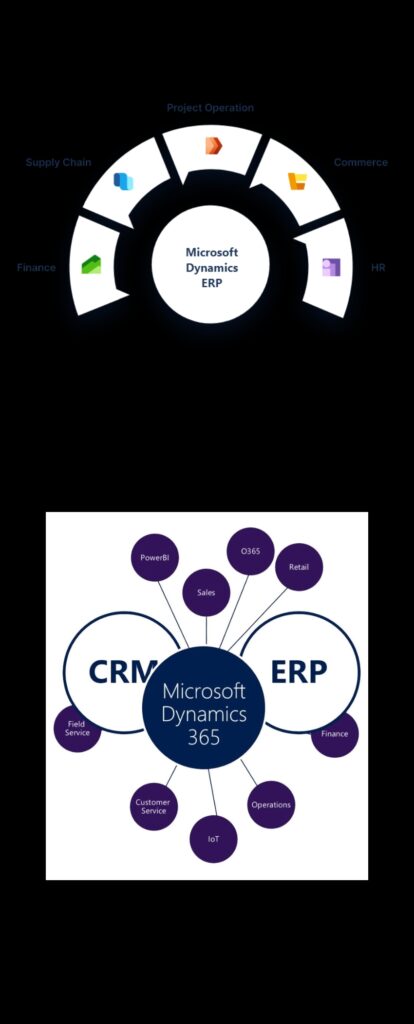
Microsoft Dynamics 365 is a robust cloud-based ERP solution that combines business functions such as finance, sales, customer service, and operations into one integrated platform. With its comprehensive tools for business intelligence, artificial intelligence, and automation, Microsoft Dynamics 365 empowers businesses to streamline operations and improve customer engagement.
As an increasingly sought-after skill set in the job market, expertise in MS Dynamics 365 ERP can give you a competitive edge. Whether you aim to become a Dynamics consultant, business analyst, or ERP project manager, our MS Dynamics 365 ERP course will provide you with the foundational knowledge and practical skills to succeed.
What Is MS Dynamics 365 ERP?
At Digital Gurus Academy, we dive deep into these functionalities, preparing you for real-world applications and career success. Our MS Dynamics 365 ERP course online covers everything you need to know about this powerful tool.
Finance & Operations
Manage finances, streamline operations, and optimize supply chains.
Sales & Marketing
Improve customer relationship management (CRM), enhance sales workflows, and automate marketing campaigns.
Customer Service
Deliver exceptional customer support and manage service contracts.
Retail & Commerce
Integrate retail and e-commerce operations for seamless customer experiences.
MS Dynamics 365 ERP integrates both enterprise resource planning (ERP) and customer relationship management (CRM) functions, making it a versatile platform for businesses of all sizes. Some key features of Microsoft Dynamics 365 include:
Why Should You Enroll in the MS Dynamics 365 ERP Course at Digital Gurus Academy?
Our Microsoft Dynamics 365 course provides a complete overview of the platform, from the basics to advanced configurations. You’ll learn everything from setting up financial management systems to creating automated sales processes.
Gain practical experience through interactive modules and case studies. Digital Gurus Academy ensures you are ready to implement MS Dynamics 365 in real-world business environments.
With our MS Dynamics 365 course online, you can study at your own pace. Whether you prefer to learn in the morning, afternoon, or late at night, our course materials are available 24/7 for your convenience.
On completion of the course, you’ll receive certification from Digital Gurus Academy, a name trusted by professionals worldwide. This certification will validate your expertise in MS Dynamics 365 ERP and increase your career prospects.
Our trainers at Digital Gurus Academy are seasoned professionals who have hands-on experience with Microsoft Dynamics 365 implementation in various industries. They provide expert guidance, helping you navigate complex concepts with ease.
The Microsoft Dynamics 365 course online at Digital Gurus Academy is designed to equip you with the skills needed to pursue a wide range of career paths, including ERP consultant, business analyst, and project manager.
What Will You Learn in the MS Dynamics 365 ERP Course?
- 1.01 Legal Entity creation (Company Creation)
- 1.02 Number Sequences
- 1.03 Organization Hierarchy
- 1.04 Operating Units
- 2.01 General Ledger Parameters
- 2.02 Ledger setup
- 2.03 Chart of Accounts
- 2.04 Financial dimensions setup
- 2.05 Accounts structure setup
- 2.06 Advanced rule structure setup
- 2.07 Currency and Exchange Rate Setup
- 2.08 Fiscal calendar, Periods, and Fiscal Year Setup
- 2.09 Date Intervals
- 2.10 Journal setup
- 2.11 Journal names
- 2.12 Account Allocations Terms
- 2.13 Accounts for automatic transactions
- 2.14 Balance Control Accounts
- 2.15 Working with Journals
- 2.16 Enter General Ledger Transactions
- 2.17 General Ledger Transaction Reversal
- 2.18 Inquiries and Reports Related to the Chart of Accounts
- 2.19 Inquire and View Reports on Daily Journal Transactions
- 2.20 Intercompany accounting
- 2.21 Closing of financial period and year
- 2.22 Financial Statements (Balance sheet, Income statement, Cash flow statement)
- 3.01 Tax Setup (Enable Legal entities for GST)
- 3.02 Tax Authorities
- 3.03 Sales Tax Settlement Periods
- 3.04 GST Codes
- 3.05 Item GST codes
- 3.06 GST group
- 3.07 GST Related GL Codes and map them in Tax Setup
- 3.08 GST Rates
- 3.09 Purchase order with GST
- 3.10 Purchase Invoice with GST
- 3.11 Sales order with GST
- 3.12 Sales Invoice with GST
- 4.01 Vendors
- 4.02 Vendor Groups
- 4.03 Payment Schedule
- 4.04 Terms of Payment
- 4.05 Payment Days
- 4.06 Cash Discount
- 4.07 Payment Fee
- 4.08 Methods of Payment
- 4.09 Accounts Payable Posting Profiles
- 4.10 Enter Transactions Using Invoice Journal
- 4.11 Three way matching
- 4.12 Two way matching
- 4.13 Enter Transactions Using Purchase Orders
- 4.14 PO Prepayments and settlement of prepayments
- 4.15 Payment journal process
- 4.16 Invoice and Payment Settlement process
- 4.17 Reversal of transactions
- 4.18 Centralized payments
- 5.01 Customers
- 5.02 Customer Groups
- 5.03 Payment Schedule
- 5.04 Terms of Payment
- 5.05 Payment Days
- 5.06 Cash Discount
- 5.07 Payment Fee
- 5.08 Methods of Payment
- 5.09 Accounts Receivable Posting Profiles
- 5.10 Enter Transactions Using Invoice Journal & Sales Orders
- 5.11 SO Prepayments and settlement of SO with prepayments
- 5.12 Free Text invoice
- 5.13 Settlement process
- 5.14 Payment journal process
- 5.15 Form notes
- 5.16 Reversal of transactions
- 6.01 Bank Account Creation
- 6.02 Bank Transaction Types
- 6.03 Bank Groups
- 6.04 Cash and Bank Management Parameters
- 6.05 Check Setup
- 6.06 Enter Bank transactions - Checks, Electronic fund transfers etc.
- 6.07 Manual Bank reconciliation
- 6.08 Advance Bank reconciliation setups and overview
- 7.01 Dimensions for Budgeting
- 7.02 Budget model
- 7.03 Budget allocation keys setup
- 7.04 Budget Cycle spans
- 7.05 Budget control configuration
- 7.06 Budget register entries
- 7.07 Budget check performed - Journals
- 8.01 Credit Management Functionalities
- 8.02 Credit Limits (Credit Limits and temporary Credit Limits)
- 8.03 Account Statuses
- 8.04 Insurances and Guarantees
- 8.05 Risk Score
- 8.06 Aging Period Definitions
- 8.07 Aging Snapshot
- 8.08 Collection Letters
- 8.09 Interest Notes
- 8.10 Customer Write off
- 8.11 Credit and Collections Parameters
- 9.01 Revenue Schedules Setup
- 9.02 Revenue Recognition Journal setup
- 9.03 Sales orders with Revenue schedule
- 9.04 Recognize revenue through Revenue Schedule
- 10.01 Fixed Asset Groups
- 10.02 Depreciation Profiles
- 10.03 Fixed Asset Books
- 10.04 Posting Layers
- 10.05 Fixed Asset Posting Profiles
- 10.06 Fixed Asset Parameters
- 10.07 Asset Acquisition through Fixed Asset Journal
- 10.08 Asset Acquisition through Purchase Order
- 10.09 Asset Acquisition through Invoice Journal
- 10.10 Asset Acquisition Adjustments
- 10.11 Run Depreciations to Asset
- 10.12 Disposal of Asset (Sale)
- 10.13 Disposal of Asset (Scrap)
- 10.14 Asset Revaluations
- 10.15 Asset Transfers
- 10.16 Split Asset
- 11.01 Legal Entity creation - Consolidation & Elimination
- 11.02 Consolidation process
- 11.03 Elimination journals
- 11.04 Elimination rule setup
ER, Data Management and Feature Management
Benefits of Choosing Digital Gurus Academy for Your MS Dynamics 365 ERP Course
- Access to Expert Mentors: Learn from industry professionals who bring years of experience with Microsoft Dynamics 365 implementations.
- Hands-On Learning: Engage in practical projects, simulations, and case studies.
- Flexible and Affordable: Learn at your own pace with our Microsoft Dynamics 365 course online.
- Lifetime Access: Enjoy lifetime access to course materials and updates.
- Global Career Opportunities: Explore a wide range of exciting career paths after certification.
Frequently Asked Questions
Microsoft Dynamics 365 ERP is a powerful business solution that integrates enterprise resource planning (ERP) functionalities with customer relationship management (CRM). Learning it helps you manage financials, operations, supply chain, and customer relationships effectively, making you a valuable asset in industries worldwide.
Digital Gurus Academy in Ameerpet, Hyderabad, is a leading training institute known for experienced trainers, hands-on practice, and job-oriented courses. They specialize in delivering industry-relevant training in Microsoft Dynamics 365 ERP.
This course is ideal for graduates, IT professionals, business analysts, project managers, and anyone interested in ERP solutions and business process optimization.
The course includes modules on finance, supply chain management, sales, procurement, inventory, reporting, and integration with other Microsoft tools like Power BI and Azure.
Yes, the course is designed for both beginners and experienced professionals. Trainers at Digital Gurus Academy ensure that even those new to ERP can understand and implement concepts effectively.
Yes, the Microsoft Dynamics 365 ERP course at Digital Gurus Academy includes hands-on training, real-world case studies, and live projects to give students practical exposure.
Upon completion, you can work as an ERP Consultant, Business Analyst, Functional Consultant, or Technical Consultant in industries such as finance, retail, healthcare, and manufacturing.
Yes, Digital Gurus Academy in Ameerpet offers placement support, helping students connect with top companies looking for Microsoft Dynamics 365 ERP professionals.
The course duration typically ranges from 2 to 4 months, depending on the schedule chosen. For detailed fee information, please contact Digital Gurus Academy directly.
You can visit Digital Gurus Academy in Ameerpet, Hyderabad, or contact them online through their website or phone to get detailed enrollment information and schedule a demo session.
Who Should Enroll in the MS Dynamics 365 ERP Course?
Aspiring ERP Consultants
Project Managers
Business Analysts
IT Professionals
Finance and Operations Managers
Career Opportunities After Completing the Microsoft Dynamics 365 ERP Course
Project Manager
Systems Administrator
ERP Implementation Specialist
Microsoft Dynamics 365 Consultant
Solution Architect
Finance and Operations Managers
Business Analyst
Success Stories









Students Placed

Reach Us
- +91 72079 82624
- +91 7842680296
- reach@digitalgurusacademy.com
Our Location
601C, 6th Floor, Nilgiri Block, Aditya Enclave, Ameerpet, Hyderabad, India.
Copyright © 2025 All rights reserved